Best Free Budgeting Apps in USA (2025): Compared and Ranked
The best free budgeting apps in USA for 2025 are Credit Karma (best overall free), Google Sheets (best free manual tracking), and PocketGuard (best freemium). These apps offer free bank sync, category tracking, and budget limits without requiring a paid upgrade for core features. True free apps are rare after Mint shut down in March 2024.
When Intuit shut down Mint in March 2024, more than 10 million users lost their free budgeting tool overnight. Popular paid apps like YNAB cost $14.99 per month or $109 per year, and EveryDollar charges $17.99 per month for bank sync. Meanwhile, a 2025 Bankrate survey found that 54% of Americans still live paycheck to paycheck. These users cannot afford $10–18 per month for budgeting apps. They need free tools that actually work without severe limitations.
This article ranks the top 5 free budgeting apps in USA for 2025 based on features, user satisfaction, and whether core features require payment. You will learn the difference between true free apps and freemium apps with limited free tiers, see a head-to-head feature comparison table, and find which app is best for your specific situation. The article also covers security risks of connecting bank accounts to budgeting apps and how to protect your data. For a step-by-step guide on building a free budget without apps, see our article on how to build a monthly budget in Google Sheets.
True Free vs. Freemium: What “Free” Really Means in 2025
Most apps marketed as “free” are actually freemium, which means the free tier is severely limited. True free apps offer all core features without requiring payment. Freemium apps lock essential features like bank sync, custom categories, or exports behind a paid paywall. Understanding this distinction matters more than feature lists when choosing a free app.
True Free Apps (No Paid Tier Required)
True free apps offer bank sync, category tracking, budget limits, and transaction history without payment. Credit Karma and Google Sheets fall into this category. Credit Karma offers unlimited bank accounts, automatic transaction categorization, and budget tracking completely free. Google Sheets requires manual entry but gives you full control with no subscription ever. These apps do not limit features to push you toward payment.
True free apps make money differently than freemium apps. Credit Karma makes money from loan and credit card recommendations, not from subscriptions. Google Sheets is free because it drives Google ecosystem usage. This business model means you get full features without payment. The trade-off is that you may see ads or product recommendations, but core features remain accessible.
Freemium Apps (Limited Free Tier)
Freemium apps offer basic features for free but lock essential features behind payment. PocketGuard offers free bank sync but limits custom categories to paid users. Goodbudget offers free envelope budgeting but limits to 5 envelopes and 1 account. Monefy offers free tracking but limits history to 3 months unless you pay. These limitations make the free tier unusable for serious budgeting.
Freemium apps are designed to frustrate free users into paying. You set up your budget, then hit a paywall when you try to add a third category or sync a second account. This pattern is intentional. The free tier is a trial, not a functional product. If you choose a freemium app, verify that the free tier meets your needs before committing. For a comparison of digital vs. cash budgeting methods, see our article on cash envelope system and whether it works better than digital.
Top 5 Free Budgeting Apps Ranked for 2025
The following ranking shows the top 5 free budgeting apps based on features, user satisfaction, and true free vs. freemium status. Rankings reflect real-world usability for people who need free tools without severe limitations. User ratings are from Apple App Store and Google Play as of early 2025.
#1: Credit Karma (Best Overall Free)
Credit Karma is the best overall free budgeting app in 2025. It offers unlimited bank account linking, automatic transaction categorization, budget tracking, and net worth tracking completely free. Credit Karma has 4.6 stars from 2.3 million reviews on Google Play. The app does not limit features to push payment. It makes money from credit card and loan recommendations, which appear as ads but do not block core features.
Credit Karma supports zero-based budgeting and 50/30/20 rule tracking. You can set custom budget limits for unlimited categories and view spending trends over time. The app also shows your credit score and credit report for free, which is a bonus feature. The main limitation is that custom transaction categorization requires manual work, and the app recommends products constantly. However, core budgeting features remain fully accessible without payment.
#2: Google Sheets (Best Free Manual Tracking)
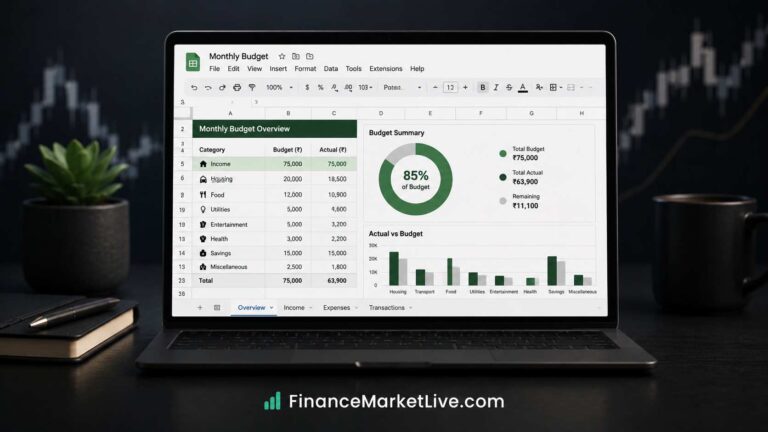
Google Sheets is the best free app for people who want full control without bank sync. It is completely free with no paid tier, works on any device, and gives you ownership of your data. You can use our free budget template with pre-built formulas for automatic calculations. Google Sheets has 4.5 stars from 8 million reviews on Google Play.
Manual entry takes more time than automatic sync, but it also gives you more awareness of spending. You see every transaction when you enter it, which reduces unconscious spending. Google Sheets works well for zero-based budgeting, sinking funds, and custom categories. The mobile app is functional for quick updates. For a step-by-step setup guide, see our article on how to build a monthly budget in Google Sheets.
#3: PocketGuard (Best Freemium)
PocketGuard is the best freemium budgeting app if you can live with free tier limitations. The free version offers bank sync, automatic categorization, and a simple “in my pocket” number that shows how much you can spend. PocketGuard has 4.7 stars from 185,000 reviews on Google Play. The paid version costs $12.99 per month or $79.99 per year.
The free tier limits you to 3 custom categories, which is severe for serious budgeting. You also cannot export data or view detailed reports. However, the core “in my pocket” feature works well for people who want simplicity. If you need more than 3 categories, upgrade to paid or switch to Credit Karma. For freelancers with variable income, see our article on how to budget on a variable income, which covers tools that work for irregular income.
Feature Comparison: Free Budgeting Apps Head-to-Head
The following table compares the top 5 free budgeting apps across 6 practical features. This comparison shows which features are free and which require payment. Use this table to choose the app that matches your needs without surprise paywalls.
| App | Bank Sync (Free) | Custom Categories (Free) | Budget Limits (Free) | Data Export (Free) | User Rating | True Free or Freemium |
|---|---|---|---|---|---|---|
| Credit Karma | Yes, unlimited | Yes, unlimited | Yes, unlimited | No | 4.6/5 (2.3M reviews) | True free |
| Google Sheets | No (manual entry) | Yes, unlimited | Yes, unlimited | Yes | 4.5/5 (8M reviews) | True free |
| PocketGuard | Yes | No (3 max) | Yes | No | 4.7/5 (185K reviews) | Freemium |
| Goodbudget | No | No (5 envelopes max) | Yes (5 envelopes) | No | 4.4/5 (42K reviews) | Freemium |
| Monefy | No | Yes | Yes | No (3-month history) | 4.6/5 (95K reviews) | Freemium |
Credit Karma and Google Sheets are the only true free options with unlimited features. PocketGuard, Goodbudget, and Monefy are freemium with severe free tier limitations. If you need unlimited categories, bank sync, and no paywalls, choose Credit Karma. If you prefer manual entry and full data ownership, choose Google Sheets. Avoid freemium apps unless you verify the free tier meets your needs.
Which Free App Is Best for Your Situation
The best free app depends on your specific situation and priorities. The following table matches common situations to the best app choice. Use this guidance if you want a quick recommendation without comparing all features.
| Your Situation | Best App | Why |
|---|---|---|
| You need bank sync and unlimited categories for free | Credit Karma | Only true free app with unlimited sync and categories |
| You want full data ownership and no ads | Google Sheets | You control everything, no third-party access |
| You want simplicity and only have 2–3 spending categories | PocketGuard | “In my pocket” number is simple and fast |
If you prefer zero-based budgeting, Credit Karma and Google Sheets both support it. Credit Karma has built-in zero-based templates, while Google Sheets requires manual setup with our free template. If you prefer envelope budgeting, Goodbudget is the only free option, but it limits you to 5 envelopes. For a detailed explanation of envelope budgeting, see our article on cash envelope system.
For zero-based budgeting specifically, you can also use YNAB, which is paid but offers a 34-day free trial. YNAB has 4.8 stars and is the gold standard for zero-based budgeting. If you can afford $14.99 per month after the trial, YNAB is worth it for serious budgeters. However, for true free without trials, Credit Karma remains the best choice.
Security and Privacy: What to Know Before Connecting Your Bank
Budgeting apps that offer bank sync require read access to your bank account transactions. They use services like Plaid or Yodlee to connect securely. These services use bank-level encryption and do not store your bank login credentials. However, they do have read access to your transaction history, which includes purchase amounts, merchant names, and transaction dates.
Credit Karma uses Plaid for bank connections and stores transaction data on encrypted servers. Google Sheets stores your data in your own Google Drive account, which means you control access. Freemium apps may sell anonymized transaction data to third parties for marketing. Read the privacy policy before connecting your bank. If privacy is a priority, choose Google Sheets for manual entry instead of bank sync.
According to the Consumer Financial Protection Bureau (CFPB), financial apps that connect to bank accounts are generally safe when they use reputable aggregators like Plaid. However, you should enable two-factor authentication on your budgeting app account and your bank account. This prevents unauthorized access even if your password is compromised. The CFPB also recommends reviewing app permissions regularly and revoking access for apps you no longer use.